Engineering a 3D Parking Twin for Desktop and Mobile
A fullscreen, detailed campus twin with shared vehicle geometry, conservative mobile LOD, sharp rendering, contextual overlays, and reliable static deployment.
Updated 2026-10-03: the detailed fullscreen campus now includes three automatic traffic cars, rolling wheels, fixed rear tracking, and the original circuit-style opening animation.
The primary experience of a parking twin is exploring the campus: rotating, zooming, entering a zone, and inspecting vehicles. Occupancy charts and operational records should appear when requested, without permanently reducing the scene area.
Desktop demo · Mobile demo · GitHub source
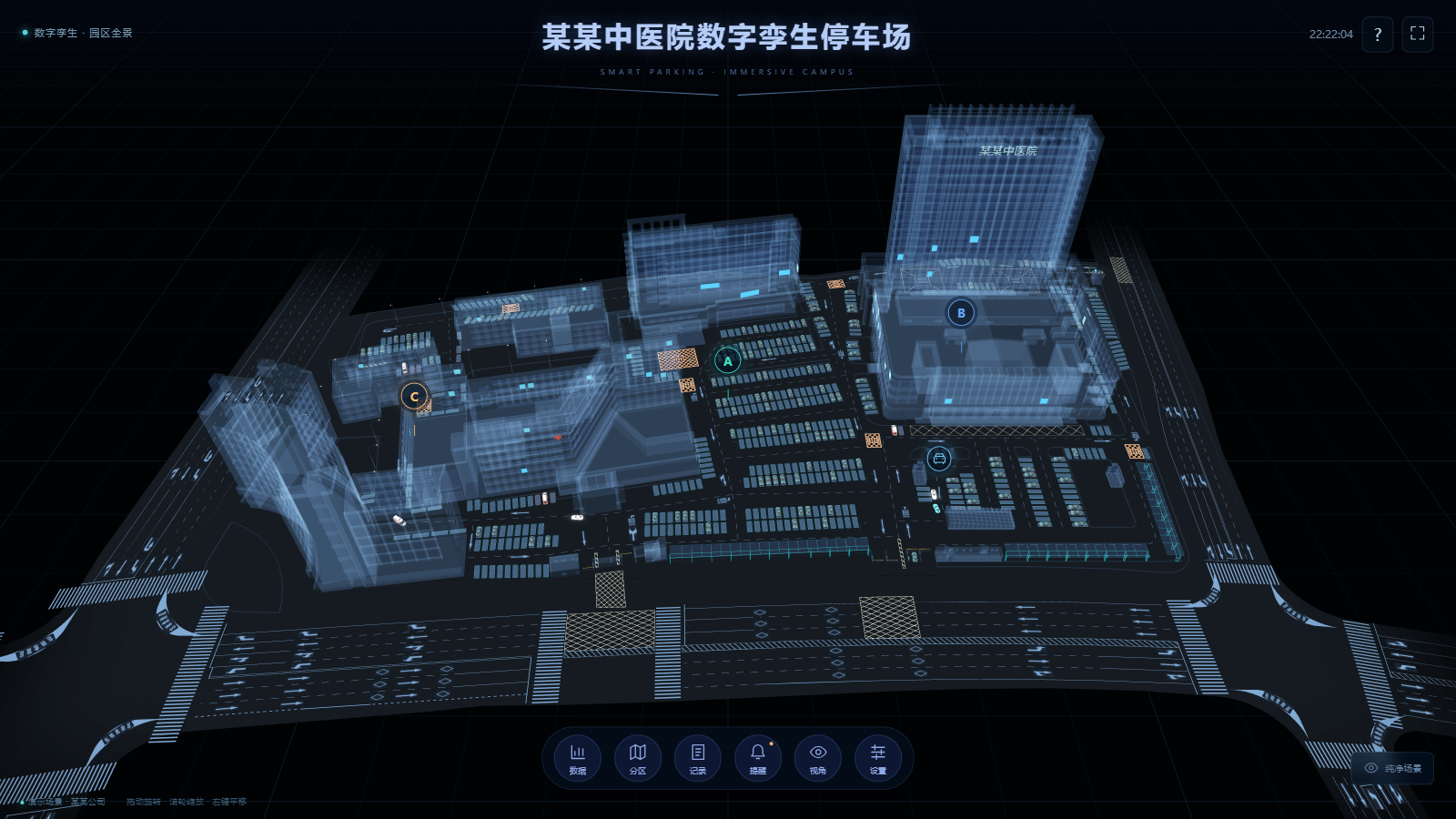
Asset optimization with visual constraints
The original Angular 18 / Babylon.js 7 project included about 616 MB of resources. Its default campus GLB was 164,807,820 bytes, and two large components duplicated loading, camera controls, charts, and timers.
The first simplification went too far: removing textures and substituting box buildings on mobile reduced download size but lost the original character and close-up quality. The revised pipeline keeps architecture, windows, road markings, parking surfaces, and vehicle materials. It targets duplication before sacrificing visible detail.
| Asset | Desktop | Mobile |
|---|---|---|
| Campus GLB | 18,953,916 bytes | 16,444,988 bytes |
| Vehicle template GLB | 1,420,956 bytes | 1,350,928 bytes |
| Campus image textures | 18 | 18 |
| Vehicle image textures | 7 | 7 |
| Parked vehicle instances | 126 | 126 |
Campus and vehicle payloads total about 20.37 MB and 17.80 MB, respectively: roughly 87.6% and 89.2% below the original default campus file. Each client requests only its own LOD. The mobile model retains the same campus and material layers rather than replacing them with a schematic scene.
Detailed geometry shared across vehicles
The source campus stored repeated vehicles as duplicated geometry. The pipeline recovers their placement and orientation from recurring plate geometry, then replaces them with a detailed shared template. Seven material layers are retained; after separating four tyres and their rims, each geometry part submits matrices for 126 thin instances.
const matrices = new Float32Array(placements.matrices.flatMap(matrix =>
  Array.from(partTransform.multiply(Matrix.FromArray(matrix)).asArray())));
mesh.thinInstanceSetBuffer('matrix', matrices, 16, true);
mesh.thinInstanceEnablePicking = true;
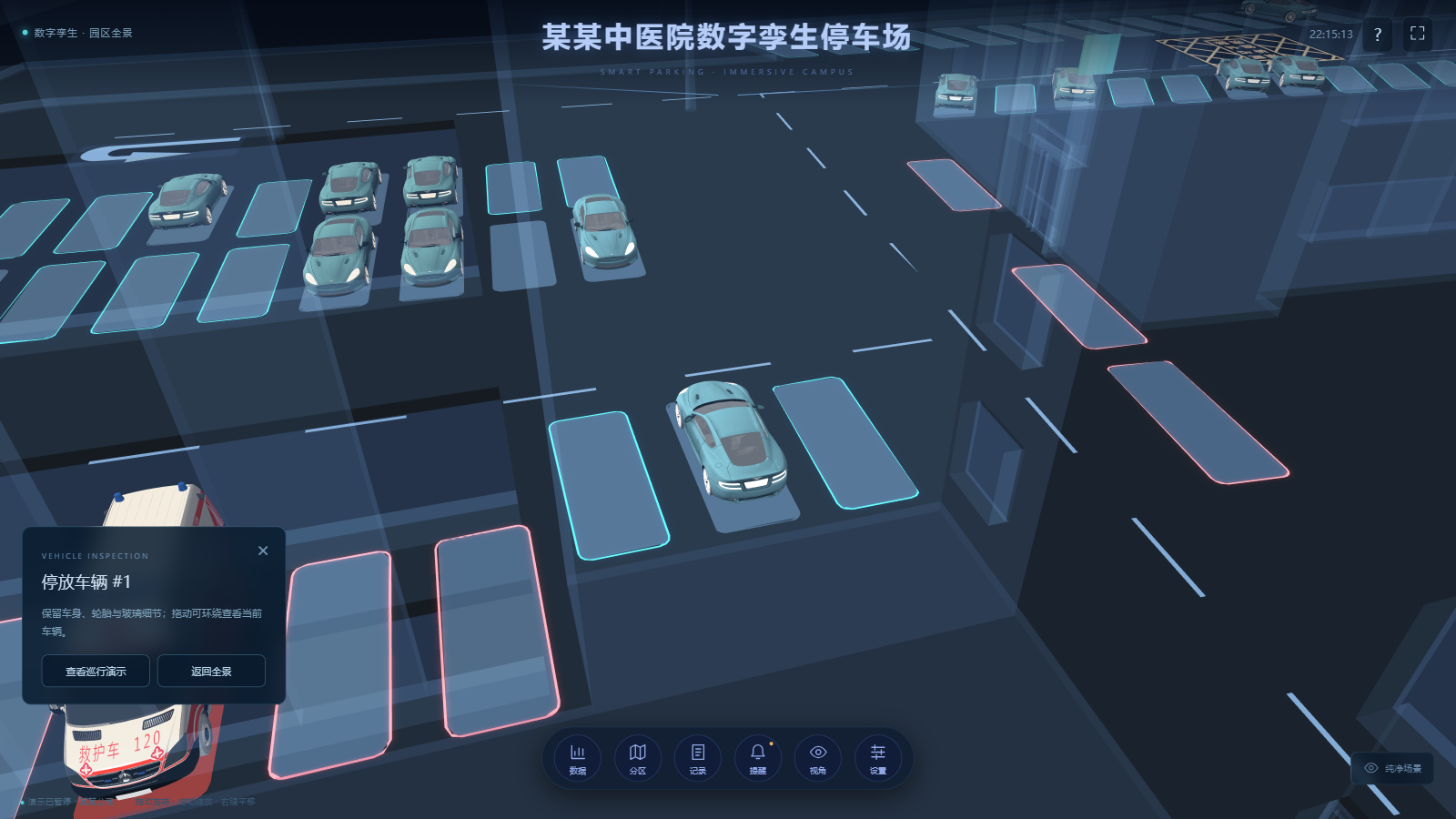
Picking returns the actual instance. A camera flight enters the selected car’s position; a separate demonstration vehicle follows a route sampled from the original animation and supports camera tracking and pause. Reusing the authored route avoids a hand-written rectangular path through buildings.
Static campus geometry is batched by material, deduplicated, welded, conservatively simplified, and resized at different desktop/mobile texture budgets. Immutable world matrices and materials are frozen, while the camera and traffic cars remain dynamic. With three cars and independent wheels, the complete revised scene contains 121 meshes.
Vehicle motion and fixed rear tracking
The source car faces -Y with -Z up, and its geometry is tilted. The offline pipeline derives a basis from the four wheel positions and normalizes the car to +Z forward and +Y up; inverse transforms preserve the parked layout. Separate tyre and rim nodes roll by travelled distance divided by wheel radius. Three authored routes use staggered offsets and speeds, and pausing stops both translation and wheel rotation.
Tracking recomputes a fixed position behind the current heading every frame, rather than only moving the orbit camera target. Camera inertia is cleared during tracking and manual controls return when tracking stops. The original circuit opening is anonymized and compressed to 1080p; it loops while assets load, finishes when ready, and includes skip and media-failure handling.
Contextual UI over an unchanged canvas
The canvas fills the viewport. A compact circular dock opens occupancy, zones, records, alerts, camera controls, and settings. Panels are hidden on entry, and opening one never resizes the scene. Closing it preserves the user’s camera position.
Zone pins, alert navigation, and parking recommendations share eased camera flights. Overview, top view, orbit, and vehicle inspection offer different exploration paths. A clean mode hides information layers, with an explicit restore control and Escape support.
Application state is separate from drawing. Angular signals derive occupancy, free spaces, and recommendations from one zone dataset; simulated records advance every five seconds. A 3,000-step test verifies bounded occupancy and one-car conservation. The logical capacity of 300 is a demonstration statistic, not a one-to-one live mapping to the 126 parked models.
Sharp rendering and mobile parity
Rendering below the canvas’s CSS dimensions produces blur regardless of model quality. The revised default uses twice the CSS pixel dimensions, subject to a four-million-pixel mobile budget and an eight-million-pixel desktop budget. A 1600×900 desktop canvas renders at 3200×1800; an 844×390 mobile canvas renders at 1688×780.
const ratio = Math.max(1, Math.min(desiredRatio,
  Math.sqrt(pixelBudget / Math.max(1, width * height))));
engine.setHardwareScalingLevel(1 / ratio);
If rendering remains slow, automatic mode reduces extra glow and drawing cadence first; it does not silently switch to a sub-native blurry canvas. The FPS counter measures actual render calls. Browser measurements are observations for that test environment, not promises for every physical device.
Mobile uses conservative LOD and keeps detailed building and vehicle textures. Single-finger rotation, pinch zoom, 44-pixel dock controls, and a dedicated landscape route provide touch-friendly exploration. Portrait layout rotates the scene, and input coordinates apply the inverse transform.
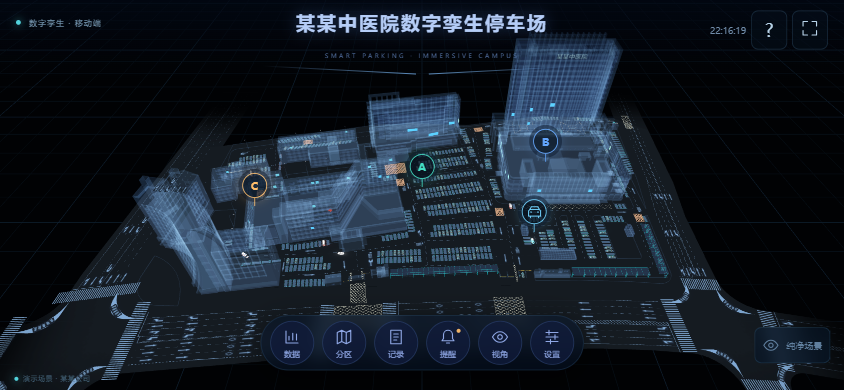
Fullscreen attempts system landscape locking, while the CSS landscape layout also handles browsers without orientation-lock support. WebGL2 is the default; ?renderer=webgpu explicitly opts into capability-tested WebGPU before assets are created.
Anonymization and deployment contracts
Anonymization covers UI names, physical sign geometry, text baked into buildings, supplier watermarks, plate textures, and metadata. The original signs and two embedded text clusters are removed; the runtime generates a readable two-sided generic hospital sign. Other textures remain intact. Old monitoring videos and fixed device addresses are excluded.
The scene class owns engine lifecycle, resize observation, camera interaction, and disposal. Hidden tabs pause rendering and simulation; route changes release engines, listeners, observers, and timers. Interrupted asset loading offers a retry of the detailed scene instead of a low-detail substitute.
Production lives under /smartParking/, with a directly refreshable /smartParking/mobile route. Static releases use timestamped directories, Nginx configuration backups, an atomic symlink switch, and rollback on failed validation. Fingerprinted scripts cache long-term; versioned models use gzip and short-term caching.
Validation includes type checking, eight data/kinematics tests, four GLB and wheel/route contracts, and forty-six local browser checks covering traffic, fixed tracking, slow loading, and portrait/landscape touch controls. Production HTTPS is checked separately after deployment. The main lesson is to define the experience that must survive optimization, then reduce redundant work around it.